Practice Management
The client is the record. Not a field on a company.
Who your clients are, who owns each relationship, what is outstanding, and — when your practice needs it — which clients a member of staff must not be able to open. The list is built for somebody working it all day: eleven views, the columns you choose, seven keyboard shortcuts, and bulk actions that leave a trail per client.
The client record
A first-class entity, with the companies hanging off it.
The problem. Most compliance software treats the company as the record and the client as a label on it. A client held that way is a contact card — a name, an email, a box of notes — so the questions a partner actually asks (who is responsible for this relationship, where does the AML file stand, what have we agreed to do for them) have nowhere to live.
- Entity type first, because it decides what else is meaningful: individual, limited company, LLP, partnership, trust, charity or other.
- The supervisory file is part of the record, not a spreadsheet beside it — risk rating, AML status, when the review was done and when the next one falls due.
- Ownership of the relationship is two named people, not one: a responsible partner and an account manager. Both count as “mine”, so a client somebody manages but does not own is never lost.
- Contacts, services, companies, deadlines, VAT records and reminders all hang off the client, so the cockpit answers “what do we do for them” as well as “who are they”.
- Every edit bumps a revision and lands in the audit trail, and the client’s own activity timeline is assembled from events that were actually recorded.
The identifiers that need handling carefully
A UTR and a National Insurance number are sealed at rest. The NI number renders masked, and revealing it is an owner-or-administrator action that decrypts server-side, returns the value for one on-screen read and records that it happened — the raw value is never embedded in the page.
The consequence is stated rather than hidden: the UTR is deliberately not searchable. Matching it would mean decrypting every row on every keystroke, which would leak exactly what the sealing protects. Company numbers, VAT numbers and PAYE references are searchable, because they are not held that way.
Portfolios & views
Eleven views, each with a live count on its chip.
The problem. A client list with one filter row is a list everybody re-filters from scratch fifty times a day. And a chip showing no number beside chips that show one reads as “zero”, which is a lie when the truth is “not counted”.
All clients. The live book, with archived and deleted records excluded.
My clients. Where you are the responsible partner or the account manager.
Unassigned. Nobody is responsible, so nobody is chasing.
Needs AML review. Overdue, never started, or last reviewed more than ninety days ago.
High risk. The rating your practice recorded, not one the software guessed.
Risk not assessed. Nobody has rated them yet — the count that stops “none high risk” reading as a clean book.
Missing information. No partner, no services, AML not started, or a company with no number.
Recently added. Onboarded in the last thirty days.
Recently updated. Changed in the last thirty days.
Inactive. Dormant, disengaging or former.
Archived. Kept and findable, and shown nowhere else.
Counts that cannot lie
- Every chip is counted from the same predicate the list itself uses, so a chip can never disagree with the page it opens.
- Archived clients are excluded from every view but Archived, and soft-deleted ones from all of them — so a removed client cannot quietly reappear in a filter used daily.
- The counts are one parallel batch of indexed counts, and the rows are one bounded page with the relation totals pulled in the same statement. Cost is a function of page size, not book size.
“Mine”, properly defined
- My clients means responsible partner OR account manager. Filtering on the partner field alone would silently drop everything you manage without owning.
- “Mine” also composes on top of whichever view is selected, so my AML reviews outstanding is expressible. Without it, a dashboard card saying 800 opened a practice-wide list saying 4,800.
- A manager’s dashboard adds who is carrying what, counted per responsible partner — including the people holding nothing, because a zero is the point of a workload table.
Saved views & columns
The combinations only your practice needs.
The problem. The built-in views cover what every practice needs. They do not cover “Bristol charities on Sam”, or “high risk with AML overdue and no partner” — and a feature that answers those by adding a second, parallel filtering engine is how two parts of the same product start disagreeing.
A saved view is a managed bookmark
It stores the same query string the list already understands, so anything expressible in a saved view is expressible in the URL and both go through one visibility-scoped query builder. There is no second filtering path to drift.
The parameters it may hold are allow-listed and length-capped, so a saved view cannot smuggle in a stray banner, a redirect target, or a parameter a later release gives meaning to. The keys are sorted, so the same filters arrived at from two directions produce the same string and light up the same chip.
Personal by default, shared on purpose
Your saved views are yours and nobody else sees them. A manager can save one for the whole practice, because a shared view is practice furniture — and only a manager can delete one. The delete control is shown only to somebody it will actually work for.
Fifty per scope, and a duplicate name comes back as a sentence rather than a database error.
Ten columns, six to begin with
Type, risk, AML, partner, companies, updated, VAT number, status, contact and tags. The client name is not in the list because it is not optional — a row with no identity is not a row.
The choice travels in the URL rather than a hidden per-user setting, so a layout is bookmarkable and shareable, and a saved view carries its columns with it: the AML review list has the same shape every time anybody opens it.
Keyboard & search
Built for the person who lives in this list.
The problem. Somebody works this screen for six hours a day. Every mouse trip to a checkbox is a tax on them. And a search that answers 10000006 with “Greenwich Holdings 7 Ltd” is asking to be taken on trust, which is precisely how somebody acts on the wrong client.
Seven keys, on native focus
- /
- Focus the search box
- j or ↓
- Next client
- k or ↑
- Previous client
- x
- Select or deselect the row
- Enter
- Open the client
- Esc
- Leave the field, clear the selection
- ?
- Show or hide the shortcut list
Moving down the list moves real browser focus onto the row’s own link, so Enter already opens it, the row scrolls itself into view, the focus ring is the one the rest of the application uses, and a screen reader announces the row without any extra plumbing. The shortcuts stand aside the moment you are typing in a field, and Escape works from inside one.
Your recent searches stay in your browser and are never sent to the server. A search term here is usually a client’s name: storing that history centrally would create a register of who looked up whom, which the feature does not need and your practice would then have to answer for.
Search that shows its reasoning
- It searches what an accountant actually types: client, legal and trading names, the contact’s name, email and phone, company number, VAT number, PAYE reference, tags, additional contact rows, and the names and numbers of the companies underneath the client.
- Every row that matched on something other than its own name says why — the field that matched, with the matching characters marked.
- The highlight comes from an offset computed on the server, so an identifier matched with the spaces stripped out (“GB 100” finding “GB100000000”) still marks the right characters.
- A term that finds nothing gets one loosened retry — legal-form suffixes and punctuation dropped, so “Acme Limited” finds “Acme Ltd” — and the page says so, naming what you typed and what it used, with a link to search that properly.
- Deliberately not a similarity search. A fuzzy threshold over a client book quietly returns the WRONG company, which in a compliance product is worse than returning none.
Bulk actions
Fast, and therefore treated as privileged.
The problem. Above about fifty companies, one-at-a-time stops working: a partner leaves, a risk policy changes, an AML sweep completes. But an endpoint that accepts a list of identifiers is also the easiest way to reach past every boundary in the product, and the easiest place for a partial failure to be reported as a success.
- Bulk assign a responsible partner or account manager; bulk set risk rating and the AML chase state; bulk add and remove tags; bulk archive and restore; and export the selection as CSV.
- Each re-establishes who you are from the session and never trusts the submitted list: the identifiers are intersected with a real, visibility-filtered query, so a bulk action can never reach further than the same action performed one row at a time.
- The same role gate as the single-record path — reassignment and supervisory changes are a manager’s call, archiving an administrator’s, tagging anybody’s.
- One audit entry per client, written inside the same transaction as the change, so the trail answers “what happened to this client” rather than “a batch ran”.
- Nothing is swallowed: every action reports how many identifiers it skipped and why, so a silent partial success is impossible.
- A batch can never be marked AML-complete. Concluding due diligence records who did it, when, on what reasoning and what they examined — one client at a time, because a bulk action cannot examine a passport.
- The CSV omits the sealed UTR, neutralises cells that a spreadsheet would execute on open, and records that a bulk read of the client book took place.
11
built-in views
Each counted from the same predicate the list uses, so a chip cannot disagree with the page it opens.
500
clients per bulk action
A deliberate ceiling. Beyond it the product asks you to narrow the filter and repeat.
1
audit entry per client
Not one per batch — and written in the same transaction as the change it describes.
The client-visibility wall
In the query, not in the interface.
Two layers, and they are not the same thing. Tenancy — a client belongs to exactly one practice — is absolute, always enforced and not configurable. Visibility, meaning which of your own staff may see which of your own clients, is a setting, because a sole practitioner and a twenty-person firm acting on both sides of a dispute need different answers.
The setting is yours, and it starts off
The default is that everyone sees every client, which is how most practices work and what every existing deployment already had. Nobody is silently hidden from anybody on an upgrade; a firm turns the wall on deliberately. The switch is owner-only, and the change is audited with the old value and the new — so “who opened the book up, and when” is answerable afterwards.
What restricted actually means
Staff see the clients where they are the responsible partner or the account manager. Owners and administrators always see the whole book — somebody has to be able to fix an assignment, and a wall nobody can look over is an operational trap. Whether managers still see everything is a separate switch, so a strict wall is available to a firm that needs one.
Composed into the query
The restriction is a database query fragment combined with the tenancy filter, not rows fetched and then hidden by the interface. It is carried through to the records that hang off a client, so it reaches the client list and each client’s own page, companies, deadlines, the practice-wide search, the chase list, corporate actions, the company secretarial worklist, document packs and the dashboard counts.
Hiding a row is not access control
Filtering a list does nothing about somebody typing a URL, so opening one client asserts the same rule and refuses. The refusal does not distinguish “behind the wall” from “does not exist”, because telling a staff member that a client they may not see nonetheless exists is most of the leak the wall is there to prevent.
Two things we will say out loud
First, the wall is enforced surface by surface. Each query composes the fragment; there is no single gate that catches a new screen automatically, so extending the product means extending the wall with it. We would rather you knew that was a discipline than believed it was magic — and it was proven necessary by execution rather than by review: with the wall on, a walled client’s name was still reachable through the companies page, the deadlines list and the practice-wide search until each of those queries was given the fragment.
Second, most practices never turn it on, and the product does not push them to. A restricted list says why it is restricted, so a short list never reads as missing data — and a figure that covers only what you can see is labelled that way rather than claiming to describe the whole practice.
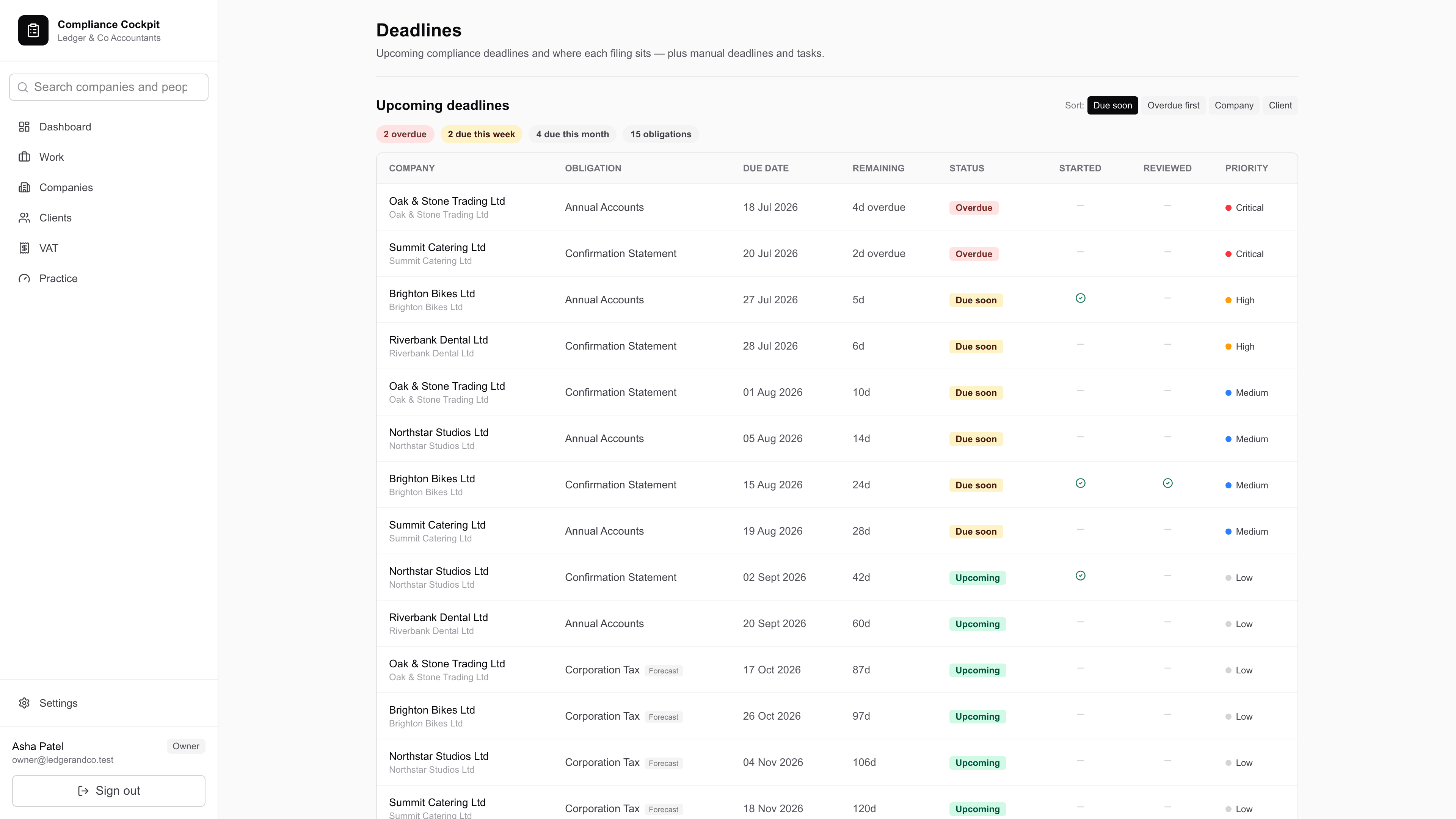
Deadlines & workload
What is due, who is carrying it, and what is late.
The problem. A deadline typed into a spreadsheet drifts from the company it belongs to the moment either changes. And a work queue that lists everything lists nothing: the question on a Monday is what is waiting on a decision, not what exists.
- Deadlines are computed from the record — accounts, confirmation statements, VAT returns and corporate action filings — rather than typed in, so they cannot drift from the company they describe.
- Priority follows the date: overdue is critical, the coming week is high, and the queue re-sorts itself without anybody maintaining it.
- The workflow centre gathers work from every source that already exists — Companies House monitoring alerts, client requests awaiting review, outstanding identity verification, an overdue confirmation statement, a reconciliation needing action, gaps in a client record, and corporate actions waiting for approval or for someone to apply them to the register.
- Each gathered task is keyed to its source, so it is never raised twice and closes itself when the source clears. Tasks somebody typed by hand are never closed for them.
- A form with a statutory deadline becomes a dated task that is marked overdue once the date passes — the work is tracked; the submission itself is made by a person at your practice.
- Tasks can be assigned, closed or flagged for chasing in bulk, and exported as CSV. Flagging is advisory: it records that you chased, and sends no email on your behalf.
The deadline board and the filing board both name the client against every row, so both are given the visibility fragment — as is the client picker for adding a deadline, because offering a walled client would disclose them and then produce a write the product refuses.
See it against your own client book.
Half an hour, no slides. We will turn the wall on and off in front of you, run a bulk reassignment and show you the audit entries it wrote, and point out the parts that do not work yet as well as the parts that do.
Priced per practice by portfolio size, so the whole team works in one place. How we handle your data